Best image format for web pages in 2026: WebP, AVIF, JPG or PNG?
Not sure which is the best image format for a website? Use WebP for most images, AVIF if you can add a fallback, PNG only when you need transparency, and JPG when it must open anywhere. Below are the file sizes we measured, side by side, so you can see what each choice costs.
Reference
What we measured
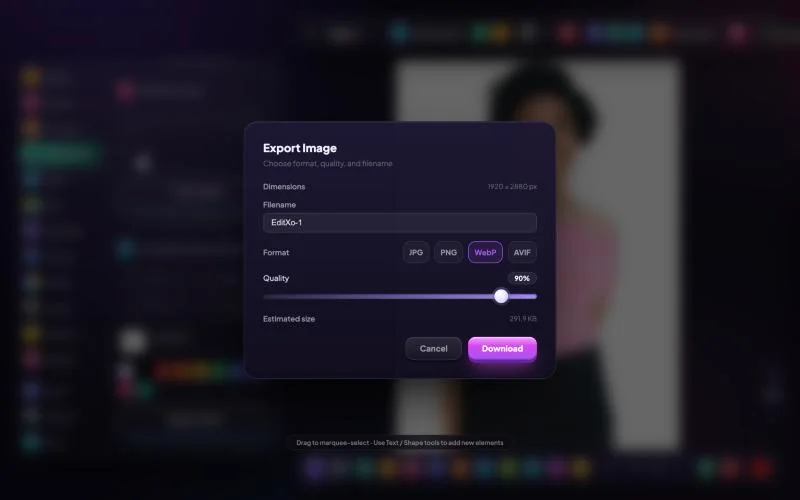
We took two source images and encoded each with the same open-source library (sharp, which wraps libvips) at settings that look visually identical on a normal screen. The first is a real 800 x 500 screenshot of the EditXo interface: flat colours, text, and a photo region. The second is a 1200 x 800 test image with smooth gradients and fine noise, which behaves like a photograph. Your results will differ in detail, but the ratios are typical.
| Format and setting | Screenshot 800x500 | Photo-like 1200x800 | Relative to JPG 85 (ratios from unrounded byte sizes) |
|---|---|---|---|
| PNG, lossless | 212 KB | 2,384 KB | 6.6x and 15.8x larger |
| JPG, quality 85 | 32 KB | 151 KB | 1.0x |
| WebP, quality 80 | 16 KB | 109 KB | 0.49x and 0.72x |
| AVIF, quality 60 | 13 KB | 63 KB | 0.40x and 0.42x |
Reference
PNG vs JPG for the web
PNG vs JPG comes down to what is in the picture. JPG is built for photos. PNG is built for sharp edges, text and transparency.
On the same images, lossless PNG was 6.6 times larger than JPG at quality 85 for the screenshot and 15.8 times larger for the photo-like image. For a photo on a web page, that gap slows the page for no visible gain.
JPG vs PNG for a logo or a screenshot with text is the other way round: PNG keeps edges crisp and supports transparency, and JPG adds blur around thin lines.
So pick JPG for photos and PNG for logos, icons and screenshots. If you control the site, WebP beats both.
| JPG | PNG | |
|---|---|---|
| Best for | Photos | Logos, icons, screenshots with text |
| Transparency | No | Yes |
| Size on our photo-like image | 151 KB | 2,384 KB |
In depth
WebP vs PNG
Lossless WebP is about 26% smaller than PNG (23% to 42% depending on the PNG encoder, per Google's WebP pages) and keeps transparency, so it can replace PNG on a page you control. Keep PNG for files you hand to other people or to software that may not open WebP.
Our 16 KB WebP screenshot was lossy at quality 80, so it is not a fair match for the 212 KB lossless PNG. For a fair test, export both lossless. See What each format is for below for where each one opens.
In depth
AVIF vs WebP
AVIF was smaller than WebP on both of our test images: 13 KB against 16 KB for the screenshot, and 63 KB against 109 KB for the photo-like image. Against JPG, AVIF came out at about 40% of the size.
The cost is support. AVIF opens in Chrome, Firefox and Edge, and in Safari from 16.4 (partial on desktop in 16.1 to 16.3). Serve AVIF first, then WebP, then JPG, and every visitor gets a file their browser can open.
Reference
What each format is for
| Format | Compression | Transparency | Animation | Opens in | Use it for |
|---|---|---|---|---|---|
| JPG | Lossy | No | No | Everything, since 1992 | Photos when compatibility matters more than size: email, old CMSs, print workflows |
| PNG | Lossless | Yes | No | Everything | Logos, icons, screenshots with text, anything needing exact pixels or transparency where WebP is not allowed |
| WebP | Lossy or lossless | Yes | Yes | All current browsers; Safari full support from 16.0 (partial 14 to 15.6 on desktop; iOS Safari 14 and later) | Photos and graphics on any site you control |
| AVIF | Lossy or lossless | Yes | Yes | Chrome, Firefox, Edge; Safari full support from 16.4 (partial 16.1 to 16.3 on desktop) | Smallest files; serve with a WebP or JPG fallback for older devices |
Checklist
A rule you can apply without thinking
- Photo on your own website: WebP at quality 75 to 82. It is about a quarter to a half smaller than JPG at matching quality, and every current browser opens it.
- Same photo, and you can set up fallbacks (HTML picture element, or a CMS that does it): AVIF first, WebP second. AVIF was roughly 40% of the JPG size in our test.
- Logo, icon, diagram, screenshot with text: PNG if exact pixels matter, otherwise lossless WebP, which Google measures at about 26% smaller than PNG (23% to 42% depending on the PNG encoder).
- Anything that leaves your control, such as an email attachment or a file for a client: JPG for photos, PNG for graphics. Nobody will ask what a .jpg is.
- Transparency: WebP on the web, PNG everywhere else.
In depth
Quality settings that are safe
Encoders’ quality scales are not comparable across formats. In our measurements and in general practice, JPG 85, WebP 80 and AVIF 60 produce images that look the same at normal viewing size. Going from JPG 85 to 100 tripled the file in our screenshot test with no visible gain. Going from WebP 80 to 90 added 30% for a small gain. The place to spend bytes is resolution, not quality: a sharp image at quality 80 beats a soft one at 95.
In depth
Resize before you convert
The largest savings have nothing to do with format. A 4000-pixel-wide camera photo in a 800-pixel-wide slot is five times as wide, about 25 times the pixels, whatever the format. Resize to the largest size the page will display (double it for high-density screens if the image matters), then convert. EditXo’s Resize tool and Export dialog do both in the browser without uploading; batch mode handles many files at once.
In depth
Best image format for SEO
Format matters for SEO only indirectly. Google does not rank a WebP above a JPG, but it does measure page speed through Core Web Vitals, and Largest Contentful Paint is usually an image. Smaller images load faster, and speed is one of many signals Google uses, and a faster page is also nicer to use. Google indexes WebP and AVIF in image search like any other format. Always give images a descriptive filename and alt text; that matters more than the format.
In pictures
See it
What is the best image format for web pages?
WebP for photos and graphics on a site you control: every current browser opens it and it is a quarter to a half smaller than JPG at the same quality. Use AVIF with a WebP or JPG fallback for the smallest files, PNG only where you need exact pixels or transparency that WebP cannot deliver, and JPG where the image must open anywhere, such as email.
PNG or JPG: which is better for a website?
JPG for photos, PNG for logos, icons and screenshots with text or transparency. On our photo-like test image, PNG was 2,384 KB and JPG was 151 KB. If you control the site, WebP is smaller than both and keeps transparency.
What is the best photo format for the web?
WebP at quality 75 to 82. In our measurement it was 49% to 72% of the JPG size at matching quality. AVIF is smaller still but needs a fallback for older devices.
WebP vs JPG: which is smaller?
WebP. At quality 80 it was 16 KB against 32 KB for JPG at quality 85 on our screenshot, and 109 KB against 151 KB on our photo-like image. Convert from the original if you have it rather than from an already-compressed JPG.
Is WebP safe to use everywhere now?
In browsers, yes: every current browser supports it, and desktop Safari fully since 16.0 (partial from 14) and iOS Safari since 14. Some desktop apps and older email clients still cannot open it, so keep JPG or PNG for files you send to people.
Should I convert my whole site to AVIF?
Only with a fallback. Safari before 16.4 may not show every AVIF, and some older Android browsers cannot show it. A picture element with AVIF, then WebP, then JPG covers everyone.
Does converting JPG to WebP lose quality?
A little, because both are lossy and you are re-encoding. At WebP quality 80 the loss is not visible. Convert from the original if you have it rather than from an already-compressed JPG.
How do I convert without uploading my images to a service?
EditXo converts in your browser: open the image, Export, pick WebP or AVIF, download. Batch mode converts many files at once.
Do it yourself
Tools used in this guide
Check the numbers
Sources and further reading
Ready to try it?
Use the free tool or the full photo editor. Everything stays on your device.