Photo filters online, free, with an intensity slider
Thirty looks, from clean classics to film emulations and portrait glows, each with an intensity slider.
- Free, no sign-up
- No upload
- Up to 50 files
How it works
Three steps, under a minute
Thirty looks, from clean classics to film emulations and portrait glows, each with an intensity slider. Unlike baked-in overlays, every EditXo filter is a stack of ordinary adjustments, so after you apply one you can open the Adjust tab and change any slider it touched. It runs on your graphics card in the browser: no upload, no account, no watermark. Up to 50 files per batch, each up to 40 megapixels at full quality.
- 1
Add your files
Drop a photo on the tool above, or choose up to 50. PNG, JPG, WebP and HEIC all work.
- 2
Apply
Pick a filter from the list and drag Intensity. The preview updates as you go; the split view shows the original on the left.
- 3
Download
Download the result as JPG, PNG or WebP. For hand changes to any slider the filter touched, open the editor: its Filter tab holds the same 30 looks.
What you get
Built for real batches, not just one file
30 looks. Classic
Vivid, Cinematic, Vintage, B&W, Warm, Cool, Fade, Drama, Sunset, Matte, Neon.
Film and creative
Fuji, Fuji Pro, Kodak, Ilford, Lomo, Cross, HDR, Moody, Arctic, Teal/Orange, Academic, Pastel, Minimal, Pop, Deep.
Portrait looks
Porcelain, Glow, Golden Hour, Blush.
Intensity slider for every filter.
Editable
Each filter is a set of adjustments you can change afterwards.
Real-time preview on your graphics card; nothing uploaded, no signup, no watermark.
Step by step
What it looks like
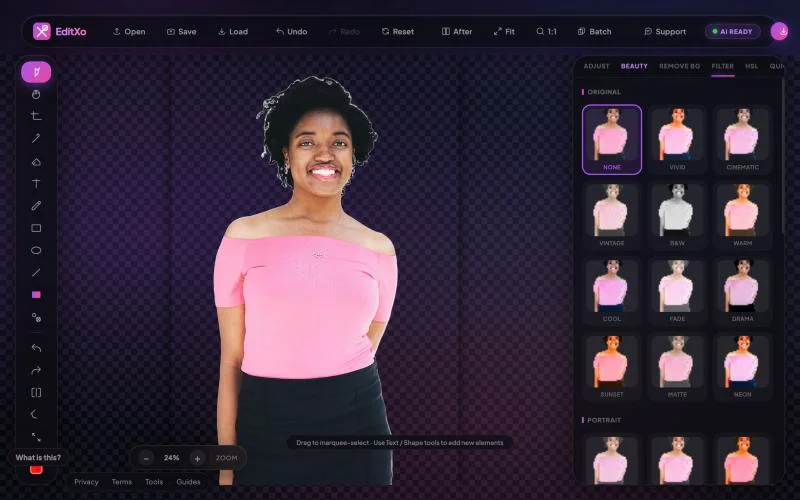
In depth
Vintage, black and white and film looks
Vintage lifts the blacks, warms the midtones and adds a little fade, the look of a scanned print. B&W converts to monochrome with a contrast curve that keeps skin from going flat; Ilford pushes it towards classic film grain. Fuji, Fuji Pro and Kodak are colour film emulations, Cross is cross-processed slide film, and Lomo adds the saturated, vignetted toy-camera look. Every one of them has an intensity slider, so a filter that is too strong at 100% is usually right at 60.
In depth
Instagram-style filters, without the app
The classic looks, Vivid, Warm, Cool, Fade, Drama, Sunset and Matte, cover the ground the familiar app filters do, and the Presets tab crops and resizes to Instagram, Story and Reel sizes in one click. Apply the filter, pick the size, export. Nothing is uploaded to anyone.
Good to know
What each filter does
| Filter | Look | Built from |
|---|---|---|
| Vivid | Punchy colour, a little brighter | Saturation, contrast, brightness |
| Cinematic | Cool, contrasty, lifted shadows | Contrast, temperature, saturation, shadows |
| Vintage | Faded warm film | Lower saturation and contrast, warmth, grain |
| B&W | Classic monochrome with bite | Saturation to zero, more contrast |
| Warm / Cool | Shift the colour temperature | Temperature, saturation |
| Fade | Soft, washed highlights | Lower contrast, lifted shadows |
| Drama | Dark, moody, vignetted | High contrast, desaturation, vignette |
| Sunset | Golden, saturated | Warm temperature, saturation, contrast |
| Matte | Flat blacks, gentle | Lower contrast, lifted shadows |
| Neon | Electric saturation | High saturation and contrast, vignette |
| Porcelain / Glow / Golden Hour / Blush | Portrait finishes | Brightness, glow, warmth, tint |
| Fuji, Fuji Pro, Kodak, Ilford, Lomo, Cross | Film emulations | Tone, colour shifts and grain tuned to each film look |
| HDR, Moody, Arctic, Teal/Orange, Academic, Pastel, Minimal, Pop, Deep | Creative grades | Contrast, temperature, saturation and shadow settings |
In depth
Filters versus presets
A filter here changes the whole image’s light and colour. It does not add textures, frames or stickers. If you want a filter on many photos at once, apply it to one, then open Batch in the top bar: the same filter and intensity are applied to every file.
Because filters are ordinary adjustments, two filters do not stack; choosing a second replaces the first. Use the Adjust tab for additive changes.
FAQ
Frequently asked questions
Can’t find an answer? The guides cover formats, sizes and privacy in depth.
Read the guidesIs there a vintage photo filter online free?
Yes. Vintage, Lomo, Cross, Fuji, Kodak and Ilford are film-style looks, each with an intensity slider, free and without a watermark.
How do I make a photo black and white online?
Open the photo, pick B&W in the Filter tab, and adjust the intensity. For a film feel use Ilford, which adds a contrast curve and grain.
Can I adjust a filter after applying it?
Yes. Filters are combinations of standard adjustments, so you can open the Adjust tab and change any slider after applying one, or reduce the Intensity slider in the Filter tab.
Can I apply a filter to many photos at once?
Yes. Apply it to one photo, click Batch in the top bar, add the other files, and export them together as JPG, PNG or WebP.
Can I save my own filter?
Not as a reusable preset yet. You can save a project and load it later from the top bar; reusable custom filters are on the roadmap.
Are my photos uploaded to a server?
No. EditXo runs entirely inside your browser using your own device. Your images are never uploaded, transmitted or stored by us, so there is nothing for anyone to intercept or leak.
Is EditXo free? Do I need an account?
EditXo is free to use and there is no account to create. Open the editor, drop in a photo and start editing.
Related tools
More free tools
Done here? Make it look great.
Adjust, retouch and add effects in the full editor. Still 100% on your device.