Instagram carousel size and safe zone: the exact pixels
Text placed too close to the edge of an Instagram slide can be cut off or covered by the app. The best Instagram carousel size is 1080 x 1350 pixels (4:5 portrait), with 1080 x 1080 (1:1 square) as the other safe option. Use one size for every slide and keep your text inside the Instagram carousel safe zone, a margin. This guide gives the sizes and limits Instagram's help pages state, a safe-zone table clearly marked as our own recommendation where Instagram publishes nothing, and a step-by-step way to resize your slides.
Reference
Instagram carousel template: a safe-zone layout you can copy
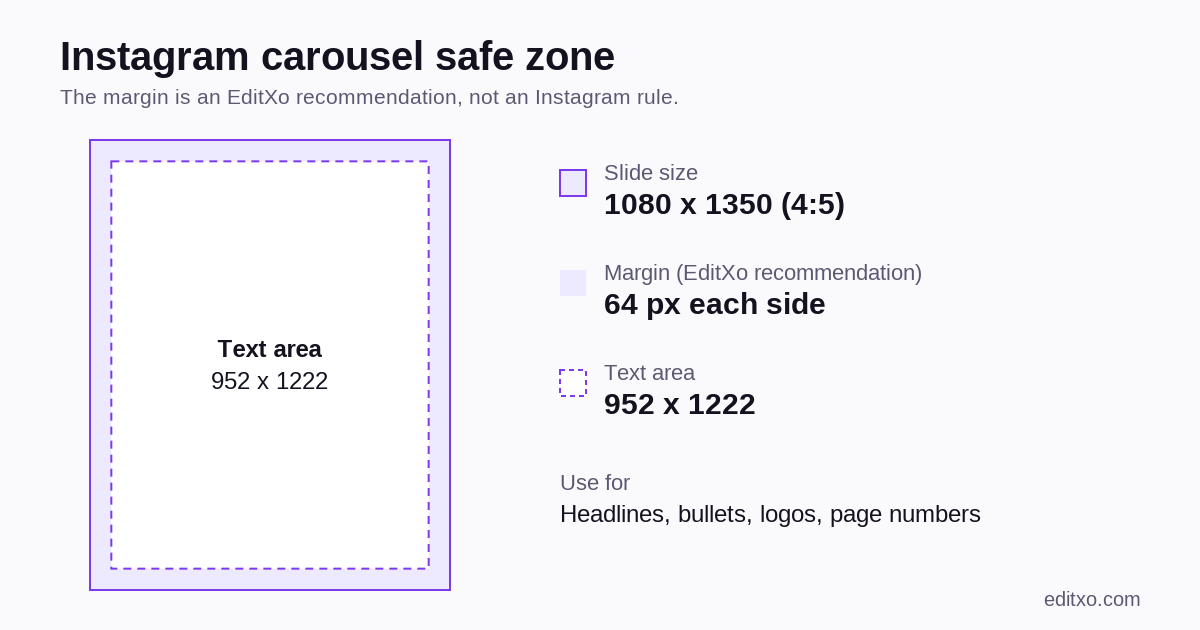
Instagram publishes no official safe-zone figure for carousel slides, so the margins below are EditXo recommendations, not an Instagram rule. They are simple arithmetic: a 64 pixel margin on every side of a 1080 x 1350 slide leaves a 952 x 1222 pixel area for text and logos (1080 minus 128, and 1350 minus 128). The margin guards against the app's rounded corners, the slide counter dots, and small differences between phones. The same margin works as an Instagram post safe zone for a single-image feed post.
To use it as an Instagram carousel template, make one blank frame at 1080 x 1350 (that is your Instagram carousel template size), draw a guide rectangle 64 pixels in from each edge, and duplicate the frame for every slide. Keep headlines and numbers inside the rectangle; backgrounds and photos can bleed to the edge.
| Slide size | Margin (EditXo recommendation) | Text area | Use for |
|---|---|---|---|
| 1080 x 1350 (4:5) | 64 px each side | 952 x 1222 | Headlines, bullets, logos, page numbers |
| 1080 x 1080 (1:1) | 64 px each side | 952 x 952 | Quote slides, simple diagrams |
| 1080 x 566 (1.91:1) | 48 px each side | 984 x 470 | Wide charts or banners with short text |
Reference
Instagram safe zone: posts, stories and Reels
Stories and Reels use a full-screen vertical frame, and 1080 x 1920 (9:16, since 1080 divided by 1920 is 0.5625) is the common working size. The Reel help page says a reel can have a ratio between 1.91:1 and 9:16, with at least 30 frames per second and at least 720 pixels of resolution. It also gives a recommended Reel cover of 420 x 654 pixels (about 1:1.55). That cover size is separate from the full-screen frame, so do not treat 1080 x 1920 as the cover size.
Instagram does not publish a story safe zone in pixels. The EditXo Story and Reel resizer tool notes recommend keeping faces and text away from the top 250 and bottom 250 pixels, because the profile strip sits at the top and the reply bar at the bottom. That leaves a 1080 x 1420 central area (1920 minus 500). It is our recommendation, not an Instagram figure.
The same goes for the Instagram Reels safe zone: we found no pixel figure on Instagram's help pages. Use the same 250 pixel bands as a rough starting point, then check the preview in the app before you post.
| Zone on a 1080 x 1920 story or Reel | Pixels (EditXo recommendation) | What to put there |
|---|---|---|
| Top band | 0 to 250 | Nothing important: the profile strip overlays it |
| Safe middle | 250 to 1670 (1420 tall) | Faces, headlines, stickers, calls to action |
| Bottom band | 1670 to 1920 | Nothing important: the reply bar overlays it |
In pictures
See it
What is the best Instagram carousel size?
1080 x 1350 pixels (4:5 portrait) is a common default and our recommendation, because it fills much of the screen and sits inside Instagram's stated range of 1.91:1 to 3:4. If you ask which Instagram carousel image size is safest, 1080 x 1080 (1:1) is the other choice. Use the same size for every slide.
How many slides can an Instagram carousel have?
The current Instagram help page says you can share up to 20 photos and videos in one post. Older help pages and many articles still say 10, so if your app does not show 20 slots, update the app.
Is there an official Instagram story safe zone?
Not in pixels, as far as the help pages we could read go. A common working rule, and the one in our Story and Reel resizer notes, is to keep faces and text away from the top 250 and bottom 250 pixels of a 1080 x 1920 frame. Treat it as a recommendation.
Where is the Instagram Reels safe zone?
Instagram does not publish one in pixels that we could find. Keep faces and text out of the top 250 and bottom 250 pixels of a 1080 x 1920 frame, and check the preview in the app. That is our recommendation, not an Instagram figure.
Where can I get an Instagram carousel template?
Make your own in any design tool: a 1080 x 1350 frame with a guide rectangle 64 pixels in from each edge, duplicated for every slide. The safe-zone section above gives the exact numbers. That margin is an EditXo recommendation.
What is the Instagram profile picture size?
We found no pixel size published for it. Instagram displays the picture as a circle, so upload a square with the subject centred; 1080 x 1080 is a safe choice but it is our advice, not an official figure.
Can I mix portrait and square slides in one carousel?
Not by item. The Instagram carousel aspect ratio is one for the whole post: the help page says one orientation (square, portrait or landscape) applies to all items and you cannot choose a different one for each photo or video. Export every slide at the same ratio.
Do it yourself
Tools used in this guide
Check the numbers
Sources and further reading
Ready to try it?
Use the free tool or the full photo editor. Everything stays on your device.