LinkedIn image sizes for 2026: every post, cover, profile and ad size
The LinkedIn image size is different for posts, banners, profile photos and company logos, and sites online disagree on each one. This guide lists every size from LinkedIn’s own help pages and names the free EditXo preset or tool that makes it. Nothing you edit is uploaded.
Reference
All LinkedIn image sizes at a glance (2026)
Sizes are width by height in pixels. “Recommended” is the figure LinkedIn gives in its own help pages; where LinkedIn states a minimum or maximum, it is in the limits column. The last column is the EditXo preset or tool that makes the size in one click.
Quick answers: post 1200 x 627, cover 1584 x 396, profile picture 400 x 400 or larger, Company Page logo 400 x 400, Company Page cover 1512 x 256.
| LinkedIn image | Recommended size | Ratio | Limits (from LinkedIn) | EditXo preset |
|---|---|---|---|---|
| Profile picture (personal) | 400 x 400 or larger | 1:1, shown as a circle | Minimum 400 x 400, maximum 7680 x 4320; JPG or PNG; up to 8 MB; no GIF | Profile picture maker |
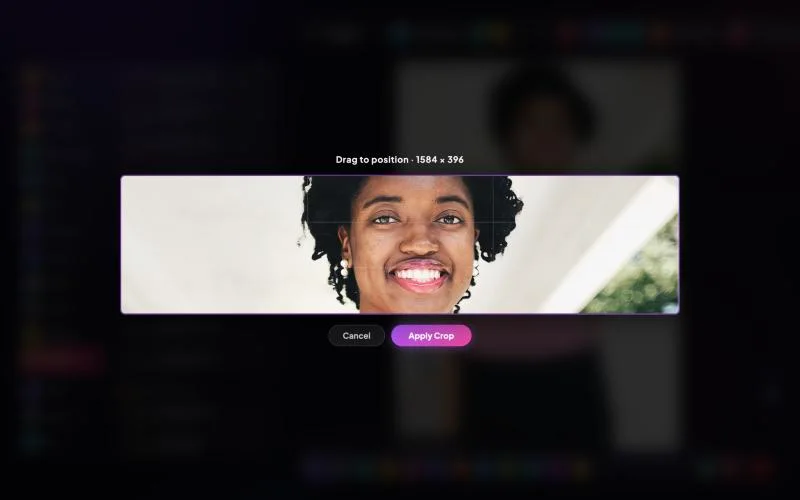
| Cover photo / banner (personal) | 1584 x 396 | 4:1 | JPG or PNG; under 8 MB | LinkedIn cover |
| Post image (image post) | 1200 x 627 or 1080 x 1080 | 1.91:1 or 1:1 | Any ratio is shown in full; portrait 1080 x 1350 takes more feed space | LinkedIn post or Instagram 1:1 |
| Link post preview image | 1200 x 627 | 1.91:1 | Images narrower than 200 px show as a small thumbnail | LinkedIn post |
| Article cover image | 1920 x 1080 | 16:9 | JPEG, PNG or WebP; cropped to 16:9; no GIF | YouTube thumb, then Resize to 1920 x 1080 |
| Newsletter edition cover | 1920 x 1080 | 16:9 | JPG, PNG or static GIF; up to 5 MB | YouTube thumb, then Resize to 1920 x 1080 |
| Newsletter logo | 300 x 300 | 1:1 | From LinkedIn’s newsletter best practices | Profile picture maker |
| Event banner | 1280 x 720 | 16:9 | Must be 16:9; minimum 480 px wide; LinkedIn’s examples are 480 x 270 and 1280 x 720 | YouTube thumb |
| Company Page logo | 400 x 400 | 1:1 | Minimum 268 x 268; JPG or PNG; up to 3 MB | Profile picture maker |
| Company Page cover | 1512 x 256 | About 5.9:1 | JPG or PNG; up to 3 MB; may be trimmed on some screens | Crop 1512 x 256, then Resize |
| Page post with a link | 1200 x 627 | 1.91:1 | Narrower than 200 px shows as a thumbnail; up to 3 MB | LinkedIn post |
| Life tab main image (Career Pages) | 1128 x 376 | 3:1 | JPG or PNG; up to 3 MB | Crop 3:1, then Resize |
| Life tab custom module image | 502 x 282 | About 16:9 | JPG or PNG; up to 3 MB | YouTube thumb, then Resize |
| Life tab company photos | 900 x 600 | 3:2 | Minimum 264 x 176; JPG or PNG; up to 3 MB | Crop 3:2, then Resize |
| Document post (PDF carousel) | 1080 x 1080 or 1920 x 1080 pages | 1:1 or 16:9 | PDF, PPT, PPTX, DOC or DOCX; up to 100 MB and 300 pages | Instagram 1:1 per page |
| Single image ad, horizontal | 1200 x 628 | 1.91:1 | Minimum 640 x 360, maximum 7680 x 4320; JPG, PNG or GIF; up to 5 MB | LinkedIn post, then Resize |
| Single image ad, square | 1200 x 1200 | 1:1 | Minimum 360 x 360, maximum 4320 x 4320; up to 5 MB | Instagram 1:1, then Resize |
| Single image ad, vertical (mobile) | 720 x 900 | 4:5 | LinkedIn recommends 4:5 to avoid borders; 628 x 1200 and 600 x 900 also accepted | Instagram 4:5, then Resize |
In depth
LinkedIn post image size
For an image post, LinkedIn does not force one shape. Any ratio is displayed in full, and on mobile other ratios are shown with padding rather than cropped. The two sizes that work everywhere are 1200 x 627 (1.91:1), which matches link previews and ads, and 1080 x 1080 square, which takes more vertical space in the feed. A portrait 1080 x 1350 (4:5) takes the most space of all and is shown in full on mobile.
When you share a link, LinkedIn builds the preview from the page’s own image at 1.91:1, so 1200 x 627 is the size to aim for if you control that page. If the source image is narrower than 200 pixels, LinkedIn shows a small thumbnail beside the text instead of a large preview.
Keep text inside the middle 90% of the image: LinkedIn adds its own rounded corners and the feed sits on light and dark backgrounds, so a thin border or edge text can be lost.
In depth
LinkedIn profile picture size
LinkedIn accepts profile photos from 400 x 400 up to 7680 x 4320 pixels, as JPG or PNG under 8 MB. GIFs are not supported. The photo is displayed in a circle, so the corners of your square image are never seen: frame the face in the centre with a little space above the head. LinkedIn asks that the photo reflects your likeness; an artistic rendering is allowed, a logo is not.
A square between 800 x 800 and 1600 x 1600 is the practical sweet spot: sharp on a Retina screen, well under the size limit, and it needs no cropping after upload. If you have cut the background out of a headshot, put it on a solid or gradient colour first; a transparent profile photo is shown on whatever LinkedIn decides, usually white.
The LinkedIn profile picture resizer makes an 800 x 800 square in one step.
In depth
LinkedIn company logo size
The LinkedIn company logo size is 400 x 400 pixels recommended, with a minimum of 268 x 268, as a JPG or PNG up to 3 MB (checked 16 November 2026). A transparent logo is shown on a white background, so check it on both light and dark before uploading.
Career Pages add the Life tab images: a 1128 x 376 main image, 502 x 282 custom module images and 900 x 600 company photos (minimum 264 x 176). A Premium Company Page can also run a dynamic cover slideshow.
In depth
LinkedIn article image size, plus newsletter and event covers
The LinkedIn article image size is 1920 x 1080, always cropped to 16:9, as JPEG, PNG or WebP; animated GIFs are no longer accepted for covers. Newsletter editions use the same 1920 x 1080 cover, up to 5 MB, and a 300 x 300 newsletter logo. Because the cover is centred and the top and bottom can be trimmed on narrow screens, keep titles in the middle third.
Event banners must be 16:9 and at least 480 pixels wide. LinkedIn’s own examples are 480 x 270 and 1280 x 720; use 1280 x 720 or 1600 x 900 so it stays sharp on the event page.
In depth
Document posts (PDF carousels)
A document post is a PDF, PPT, PPTX, DOC or DOCX of up to 100 MB and 300 pages that LinkedIn shows as a swipeable carousel. Design the pages square at 1080 x 1080 or landscape at 1920 x 1080 and keep every page the same size, since the viewer takes the shape of the first page. Flatten the PDF before uploading; videos and animations inside the document show as still images.
In depth
LinkedIn ad image sizes
Single image ads accept JPG, PNG or GIF up to 5 MB. Horizontal is 1200 x 628 (1.91:1, minimum 640 x 360), square is 1200 x 1200 (minimum 360 x 360) and vertical, which runs on mobile only, is best at 720 x 900 (4:5); LinkedIn recommends 4:5 because taller 1:1.91 images get borders added. LinkedIn suggests square for delivery across desktop and mobile.
Step by step
How to make any LinkedIn size in EditXo
- 1
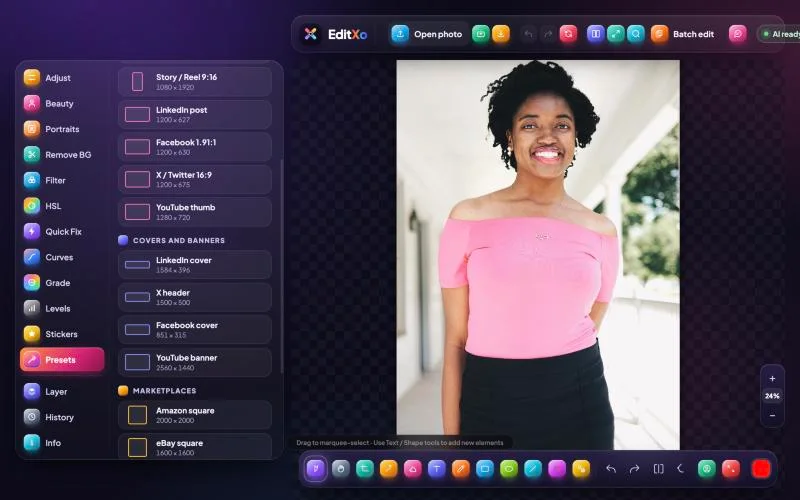
Open editxo.com and drop in your photo. The crop and resize run on your device; nothing is uploaded.
- 2
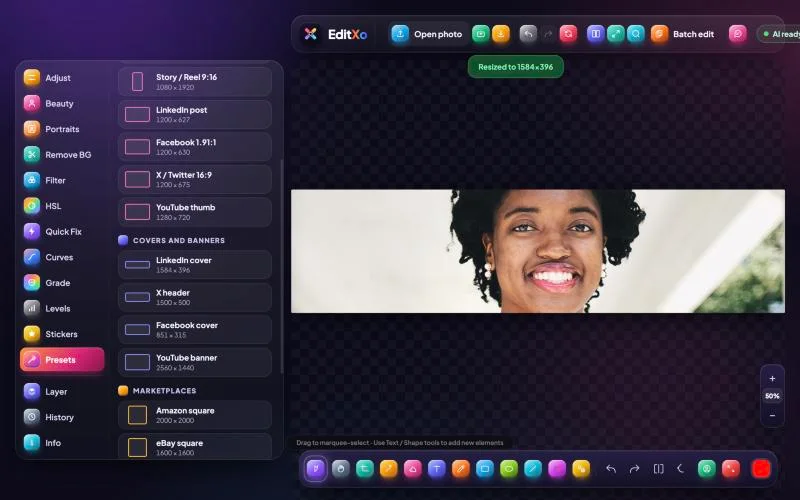
Open the Presets tab. LinkedIn cover (1584 x 396) and LinkedIn post (1200 x 627) are one click each; the preset crops to the shape and resizes to the exact pixels. Drag on the photo to choose what is kept.
- 3
For a profile picture or Page logo, open Profile picture: it frames the face in a circle preview, lets you add a background colour behind a cut-out headshot, and exports at 400 x 400 or larger.
- 4
For 16:9 covers and event banners, use the YouTube thumb preset (1280 x 720) or crop to 16:9 and type 1920 x 1080 in Resize.
- 5
For the Company Page cover and Life tab images, crop to the ratio from the table, then enter the exact pixels in Resize.
- 6
Export as JPG at quality 85 to 90 for photos, or PNG for logos. Everything stays well under LinkedIn’s 8 MB, 5 MB and 3 MB limits.
In depth
How this guide was made
The Company Page logo and cover sizes, the Life tab sizes, the Page post image and the personal cover image figures were read again on LinkedIn’s own help pages on 16 November 2026. The other sizes come from the LinkedIn pages listed under Sources, read when the guide was first written and last updated on 23 October 2026.
The text was drafted with AI assistance and checked against those pages before it went live. Nothing was copied from other size guides. If a number here no longer matches LinkedIn’s help pages, tell us through the contact page and we will correct it.
In pictures
See it
What is the LinkedIn post image size?
1200 x 627 pixels (1.91:1) is the safe choice for posts and link previews. Square 1080 x 1080 and portrait 1080 x 1350 are also shown in full and take more space in the feed.
What size is a LinkedIn cover photo or banner?
The LinkedIn banner dimensions are 1584 x 396 pixels, a 4:1 strip, as a JPG or PNG under 8 MB. Keep text and logos in the centre and right half, since the profile photo covers the bottom-left on desktop.
What is the LinkedIn company page banner size?
1512 x 256 pixels, as a JPG or PNG up to 3 MB. LinkedIn lists that as both the minimum and the recommended size, and says it may be trimmed on some screens, so keep the key part in the middle. Your personal profile banner is a different size, 1584 x 396.
What size should a LinkedIn profile picture be?
At least 400 x 400 pixels and at most 7680 x 4320, JPG or PNG, under 8 MB. Around 800 x 800 to 1600 x 1600 square is ideal. It is shown as a circle.
What is the LinkedIn company logo size?
400 x 400 pixels recommended, minimum 268 x 268, JPG or PNG up to 3 MB. The Company Page cover is 1512 x 256.
Why does my LinkedIn cover photo look blurry?
Usually the file was smaller than 1584 x 396 or heavily compressed. LinkedIn’s advice is to start from a larger, higher-quality original, and photos look sharper than logo graphics. Export at exactly 1584 x 396 at JPG quality 85 or above. The LinkedIn banner resizer makes that exact size.
Can I use a GIF for my LinkedIn profile photo or article cover?
No. Profile photos must be JPG or PNG, and article covers accept JPEG, PNG or WebP. A static GIF is accepted only for newsletter covers and in single image ads.
Did LinkedIn image sizes change in 2026?
The core sizes are unchanged: 1584 x 396 cover, 400 x 400 profile and logo, 1200 x 627 posts, 1920 x 1080 article covers. The Company Page sizes were checked on LinkedIn’s help page on 16 November 2026.
Is my photo uploaded to EditXo?
No. Cropping, resizing and export run in your browser; the file never leaves your device.
Do it yourself
Tools used in this guide
Check the numbers
Sources and further reading
- LinkedIn Help: Photo won’t upload to your profile (profile photo limits)
- LinkedIn Help: Add or change the cover image on your profile
- LinkedIn Help: Image specifications for LinkedIn Pages and Career Pages
- LinkedIn Help: Add images and other rich media to your article
- LinkedIn Help: Newsletter best practices
- LinkedIn Help: Create a LinkedIn Event
- LinkedIn Help: Upload and share documents
- LinkedIn Marketing Solutions: Single Image Ads specifications
Ready to try it?
Use the free tool or the full photo editor. Everything stays on your device.