Twitch banner size, emote size, panel size and every other Twitch image size
Not sure which size goes where on your Twitch channel? The Twitch banner size is 1200 x 480 pixels, a 5:2 shape. This guide lists every Twitch image size and file limit we could read on Twitch's own help pages: emotes, panels, profile picture, offline banner and overlay. It says plainly where Twitch gives no number, and how to make each size yourself.
Checklist
Quick answers
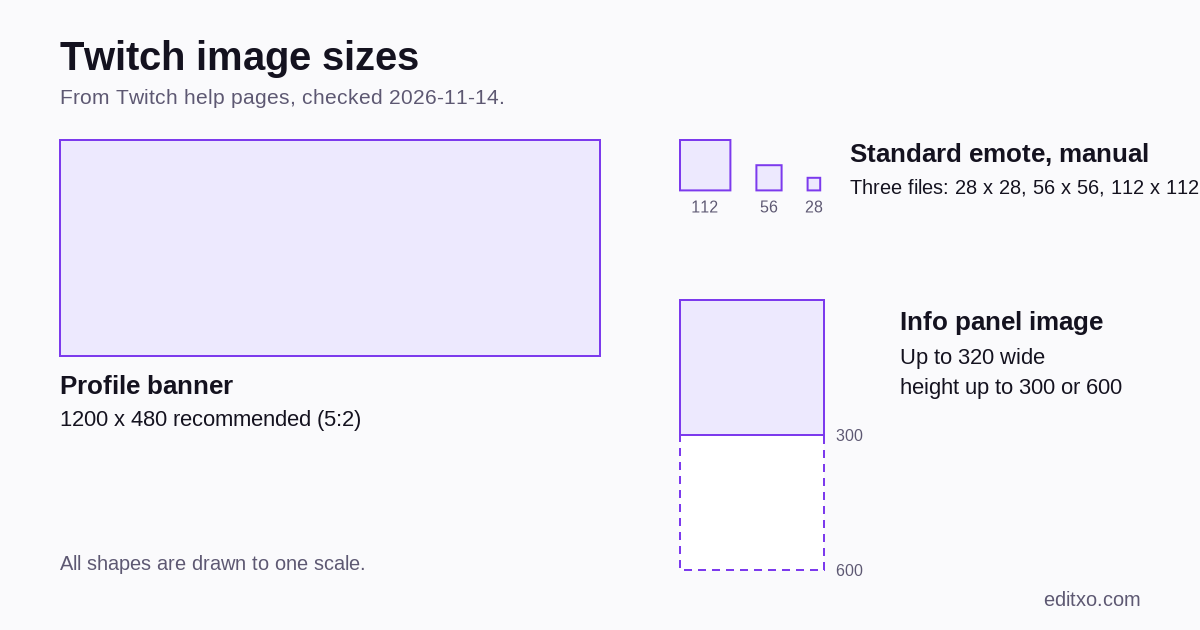
- Twitch banner size: 1200 x 480 pixels recommended, which is 5:2.
- Twitch emote size: one square PNG from 112 x 112 up to 4096 x 4096 pixels under 1 MB, or three PNGs at 28 x 28, 56 x 56 and 112 x 112 pixels.
- Twitch panel size: images up to 320 pixels wide. Twitch's own pages disagree on the height limit, 300 on one and 600 on another.
- Twitch profile picture size: Twitch gives no pixel size, only the file rule: JPEG, PNG or GIF, up to 10 MB.
- Twitch overlay size: not a Twitch spec. Overlays are built on the canvas of your streaming software, most often 1920 x 1080.
In depth
Twitch emote size: the three sizes and the two upload modes
Twitch offers two ways to upload a standard emote. Auto-resize takes one square PNG between 112 x 112 and 4096 x 4096 pixels under 1 MB and converts it into the other sizes. Manual mode asks for three separate files, 28 x 28, 56 x 56 and 112 x 112, of the same image, each under 100 KB. Manual mode is the one to use when the automatic small versions look muddy.
Twitch asks for a fully transparent background and says to check the emote at 100 percent so lines are sharp and any lettering is readable. It also notes you only have 28 pixels to work with at the smallest size, so too much detail or too many words clutter the emote.
The file limit depends on the mode. Auto-resize takes a single file under 1 MB, which matches the general 1 MB cap on the formatting page, while manual mode asks for each of the three files to be under 100 KB. These are different modes, not a contradiction. Keeping every file under 100 KB satisfies both.
Animated emotes must be GIF, square, at most 60 frames, and must not flash or flicker more than 3 times in a second. Auto-resize allows 1 MB, manual mode 512 KB per file. Emote uploading is for monetized streamers (Affiliates and Partners), and new emotes are reviewed unless you qualify for instant upload.
In depth
Twitch panel size
Panels sit under the video player. Twitch's Channel Page Setup page says panel images must be under 2.9 MB and no larger than 320 pixels wide and 300 high. Its How to Edit Info Panels page says under 1 MB and no larger than 320 wide and 600 high. Both say larger images are resized to the maximum automatically.
The width is the same on both, so make panel art 320 pixels wide. Keep the height at 300 or less and the file under 1 MB, and the image passes both versions of the rule. Twitch states no ratio for panels.
In depth
Twitch profile picture size
Twitch's help page says to upload a JPEG, PNG or GIF that does not exceed 10 MB, and gives no pixel size. That means any number you read for a Twitch profile picture is a recommendation from a third party, not a Twitch requirement. A square image with the face or logo centred is the safe shape, and a few hundred pixels across is plenty; the general reasons are in our profile picture guide.
If you want a number to work to, the sizing logic is the same as other platforms: upload larger than the display size so the picture stays sharp. The circle-cropping behaviour of Twitch's picture is not stated on the page we read, so keep the subject centred and leave margin.
In depth
Twitch badge size
Subscriber badges and Bits badges are the small icons next to your name in chat. This guide does not list a Twitch sub badge size or a file limit. Twitch's help pages did not load when we checked them on 16 November 2026, so we could not read the numbers, and we will not guess them.
Open the badge upload screen in your Creator Dashboard. Twitch should show the sizes and file rules there; we have not checked it. A badge is tiny in chat, so keep it simple and test it at its smallest size, as you would an emote.
Reference
Twitch overlay size and stream canvas (streaming software practice, not a Twitch spec)
Twitch does not set an overlay size. An overlay is an image you place on the canvas of your streaming software, so its size depends on the canvas you choose. 1920 x 1080 pixels is a standard 16:9 video resolution and a common canvas; 1280 x 720 is another. Both are the same 16:9 shape, so a design scales between them without distortion.
The scale maths is simple. Moving from a 1920 canvas to a 1280 canvas multiplies every dimension by 2/3, which is 0.6667. Going up to 2560 x 1440 multiplies by 4/3. A webcam frame of 480 x 270 on the 1920 canvas becomes 320 x 180 on the 1280 canvas. Both are 16:9 and take up 25 percent of the canvas width.
| Canvas | Scale from 1920 x 1080 | Webcam slot at 25 percent width | Shape |
|---|---|---|---|
| 1920 x 1080 | 1.0 | 480 x 270 | 16:9 |
| 1280 x 720 | 0.6667 | 320 x 180 | 16:9 |
| 2560 x 1440 | 1.3333 | 640 x 360 | 16:9 |
Step by step
Resize it now: make each Twitch size in EditXo
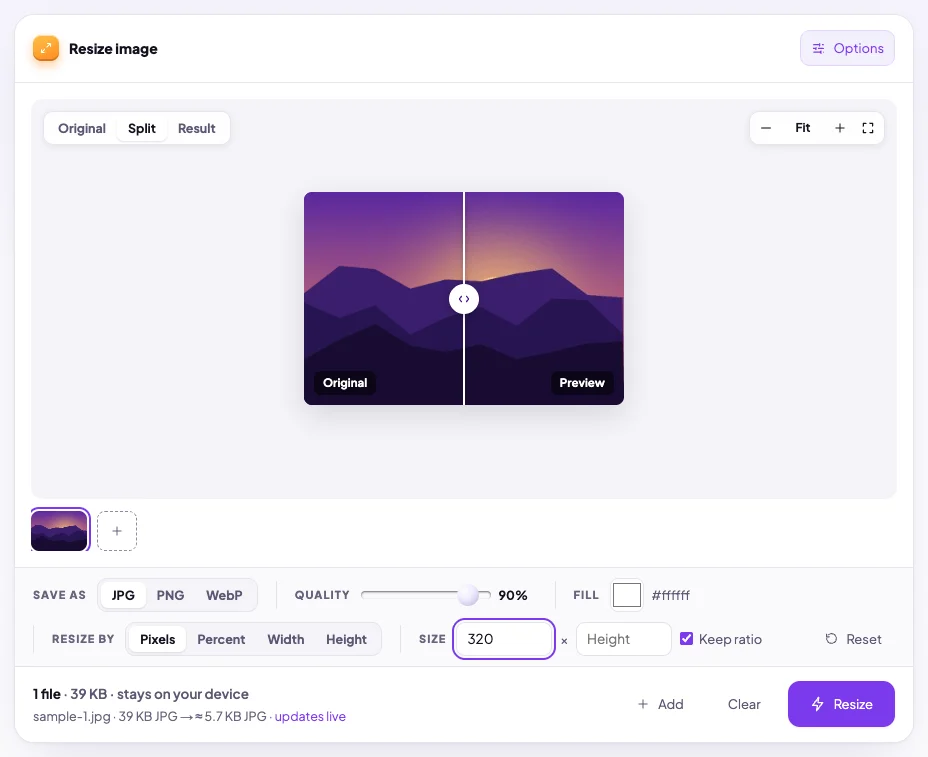
EditXo's image resizer takes exact pixel dimensions, has a Keep ratio option, and saves JPG, PNG or WebP. It runs on your device, so nothing is uploaded. PNG export keeps transparency, which emotes need, while JPG export flattens transparent areas onto white. An animated GIF loads as a single flattened frame, so the tool cannot make animated emotes.
- 1
Start from your master image: for an emote a square drawing at least 112 x 112, ideally larger and with a transparent background; for a banner a wide picture at least 1200 x 480.
- 2
Open the image resizer and add the image. Choose PNG as the output when the image has a transparent background.
- 3
For the profile banner, crop to about 5:2 first so nothing is squashed: in the crop to aspect ratio tool choose Free and drag the frame to that shape (its fixed ratios are common shapes such as 1:1, 4:3, 3:2 and 16:9). Then resize the crop to 1200 by 480 in the image resizer.
- 4
For an emote, type 112 by 112 with the lock on, choose PNG as the output, and download. Then reopen your original master and repeat at 56 by 56 and again at 28 by 28. Starting from the master each time keeps the small versions sharper than shrinking a shrunken copy.
- 5
For a panel, type 320 as the width and let the height follow, then check it is 300 or less and that the file is under 1 MB.
- 6
Open each emote file at 100 percent and look at the 28 pixel version. If it is hard to read, simplify the art and export again.
Checklist
Common mistakes
- Uploading a rectangle as an emote. Every emote size is square.
- Making emote lettering too small. At 28 pixels, thin lines and small words disappear.
- Leaving a white background on an emote. Twitch asks for a fully transparent background.
- Putting the logo in the middle of the banner. Twitch says to concentrate the graphics on the left.
- Exporting the emote as JPG. Standard emotes must be PNG, and JPG has no transparency.
- Trusting a size because many sites repeat it. The 1920 x 1080 offline screen and the 256 x 256 profile picture figures are common elsewhere but are not stated on the Twitch pages we read.
In depth
What this guide cannot tell you
Twitch updates its help pages, and two of them already disagree on the panel limits, so check the Creator Dashboard upload screen when it shows a different number. Twitch publishes no size for the video player banner, no size for the profile picture and no official overlay size. We could not read the badge or thumbnail numbers on 16 November 2026, so none are given here.
The resize tool flattens animated GIFs to one frame and cannot make animated emotes, and it cannot judge whether your design is readable at 28 pixels. That check is yours to do at 100 percent.
In depth
How this guide was made
Every Twitch size and file limit in the tables comes from four Twitch Help articles, read in full on 14 November 2026 and listed under Sources. On 16 November 2026 the Twitch help pages would not load, so no new size was added. Sizes Twitch does not publish are marked as not official instead of being filled with a guess.
An AI assistant wrote the first draft. A second automated pass compared each figure with the Twitch articles, and the scaling figures are our own arithmetic, not taken from another website. Found something out of date? Use the contact page and we will fix it.
In pictures
See it
What is the Twitch banner size?
Twitch recommends 1200 x 480 pixels, a 5:2 shape. Twitch scales the banner with the browser window width and scales images that are not 480 pixels tall to that height, so keep the important art on the left.
What size is a Twitch emote?
A standard emote is a square PNG. Upload one file between 112 x 112 and 4096 x 4096 pixels under 1 MB for auto-resize, or three files at 28, 56 and 112 pixels, each under 100 KB, for manual mode.
What is the Twitch panel size?
Panel images are limited to 320 pixels wide. Twitch's two help pages give different height limits, 300 and 600, and different file limits, 2.9 MB and 1 MB. A 320 wide image, 300 high or less and under 1 MB satisfies both.
What is the Twitch profile picture size?
Twitch publishes no pixel size. It says to upload a JPEG, PNG or GIF of up to 10 MB. A centred square picture is the safe choice.
What is the Twitch overlay size?
Twitch sets none. Overlays follow your streaming software canvas, commonly 1920 x 1080, a 16:9 shape. If you switch to a 1280 x 720 canvas, scale every element by 0.6667.
Can I make animated emotes with this?
No. An animated GIF opens in the resize tool as one flattened frame, so it cannot produce an animated emote. Twitch requires GIFs of at most 60 frames for animated emotes, so make those in an animation tool.
What is the Twitch sub badge size?
We could not confirm it. Twitch's help pages did not load when we checked on 16 November 2026, and we do not publish a size we have not read. Twitch should show the current size and file rules on the badge upload screen in your Creator Dashboard; we have not checked it. Other sites quote different figures (for example 18, 36 and 72 px for badges) that we could not confirm on Twitch.
What is the Twitch offline banner size?
Twitch publishes no pixel size for the video player banner, the image viewers see when you are offline. It does say animated banners are not supported. A 16:9 image is a safe shape. Check the result in your Creator Dashboard.
What is the Twitch thumbnail size?
We could not find a thumbnail size on the Twitch pages we read, so we give none. Other sites quote different figures (for example 1280 x 720 for thumbnails) that we could not confirm on Twitch. Check Twitch's help pages if you need an exact figure.
Do it yourself
Tools used in this guide
Check the numbers
Sources and further reading
Ready to try it?
Use the free tool or the full photo editor. Everything stays on your device.