Bluesky banner size and profile picture size: what is official, what is not
Bluesky banner size has no official pixel number: Bluesky's own code fixes a 3:1 shape, PNG or JPEG, and a 1,000,000 byte upload limit, and it states no pixel size. A 1500 x 500 pixel image under 1 MB fits that shape exactly, and a 400 x 400 square works for the profile picture, but both pixel sizes are community advice, and this guide labels them that way. It also shows where the round profile picture covers the banner, with numbers worked out from the app's own layout code, and how to make both images free in your browser.
Checklist
Quick answers
- Banner: 3:1 shape. Bluesky publishes no pixel size. 1500 x 500 is the common community choice and matches the shape exactly.
- Profile picture: square, 1:1, shown as a circle. Bluesky publishes no pixel size. 400 x 400 is the common community choice.
- Both images: PNG or JPEG only, and no larger than 1,000,000 bytes. This is the only upload limit in the profile record.
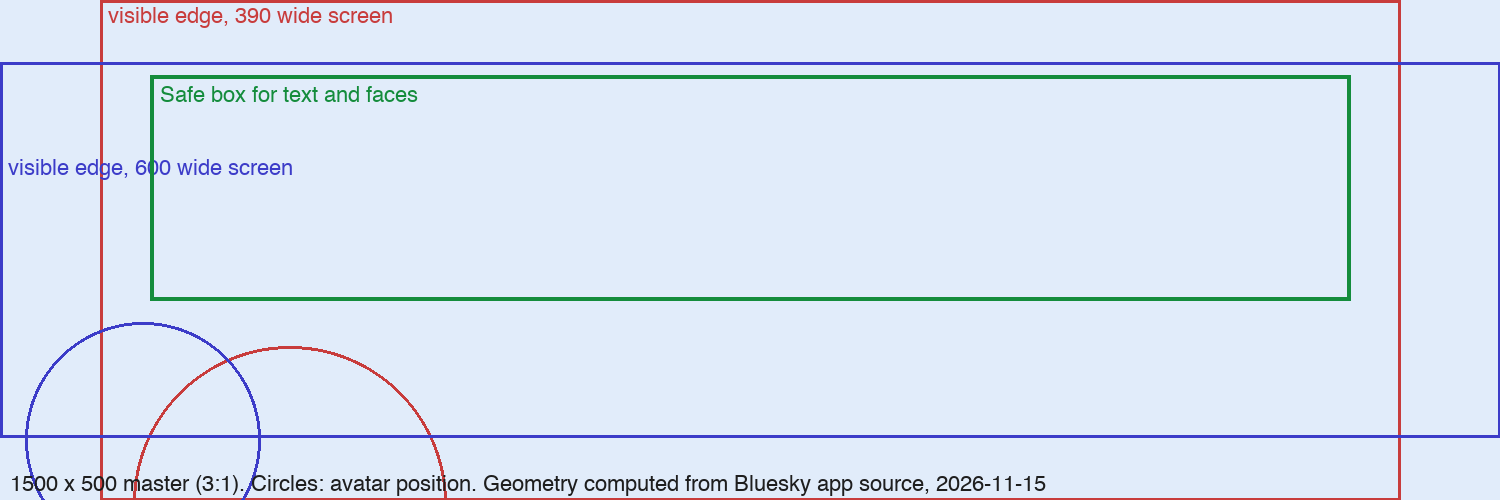
- Keep important text and faces in the upper middle of the banner. The profile picture sits over the lower left.
In depth
What the Bluesky app does to a large file
The mobile app code includes a size rule for both images: a picked file smaller than 1,000,000 bytes is kept as it is, and a larger one is resized to at most 2000 pixels on its longest side and at most 1,000,000 bytes, then saved as a JPEG. That is why a very large master gains little. A 3000 x 1000 file that is under 1 MB is kept, and one over 1 MB becomes about 2000 x 667 (our own arithmetic: 3000 x 1000 scaled until the long side is 2000). We read the mobile app code only; the web edit path was not read, so the web app may behave differently. If you want to control the result, make the file small yourself instead of leaving it to the app.
The 3000 x 1000 figure you see on other sites also appears in Bluesky's server code, where the banner image preset is set to cover fit, 3000 x 1000, webp output. That is how Bluesky's image server serves banners, not an upload requirement, so it does not change the limits above. A code comment calls those presets soft documentation of production behavior.
In depth
Bluesky profile picture size and the circle crop
Upload a square. Bluesky's app crops the profile picture to 1:1 and shows it as a circle, so the four corners of your square are never seen. Put the face or logo in the middle with some room around it. Since Bluesky names no pixel size, 400 x 400 is a fine choice, and anything up to 1000 x 1000 works if the file stays under 1,000,000 bytes.
The Profile Picture Maker on EditXo frames a face inside a live circle preview and exports a square PNG or JPG at 320, 400, 800, 1080 or 2048 pixels, so you can see what the circle will cut off before you upload.
Checklist
Common mistakes
- Treating 1500 x 500 or 400 x 400 as an official size. Bluesky has not published either.
- Putting a name or logo in the lower left of the banner, where the profile picture covers it.
- Exporting as WebP or AVIF. Bluesky accepts PNG or JPEG for these two images.
- Judging the size by file explorer megabytes. The limit is 1,000,000 bytes.
- Using a banner that is not 3:1 and letting the app crop it for you, which can cut off the part you cared about.
In depth
What this guide cannot tell you
Bluesky can change its code and limits at any time, and third-party apps may show images differently. We read the code and package listed under Sources but did not test uploads on a live account. We found no Threads help page that states a profile picture size that we could read, so Threads is not covered. The safe box is our own calculation from the app's layout values, not a Bluesky rule.
In depth
How this guide was made
The file types, the 1,000,000 byte limit, the 3:1 and 1:1 crops, the size rule and the layout numbers come from Bluesky's own documentation, its @atproto/api package and its open source app, all read on 15 or 16 November 2026 and listed under Sources. Pixel sizes that Bluesky does not publish are marked as community advice.
The safe-zone table and the diagram were calculated and drawn by code from those layout numbers. An AI assistant wrote the first draft, and a person reviews it before it is published. Found something out of date? Use the contact page and we will fix it.
In pictures
See it
What is the Bluesky banner size?
Bluesky publishes no pixel size. The app crops the banner to a 3:1 shape and accepts PNG or JPEG up to 1,000,000 bytes. 1500 x 500 pixels is the usual community choice because it matches the 3:1 shape.
What is the Bluesky profile picture size?
Bluesky publishes no pixel size either. The picture is cropped to a square and shown as a circle, with the same PNG or JPEG and 1,000,000 byte limits. 400 x 400 is a common community choice.
Should I use 3000 x 1000 or 1500 x 500 for the banner?
Both have the 3:1 shape. 1500 x 500 is easy to keep under 1 MB. In the mobile app code, a file over 1,000,000 bytes is resized to at most 2000 pixels on the long side, so a 3000 x 1000 file that is too heavy ends up around 2000 x 667 anyway (our own arithmetic; we did not read the web edit path).
Why does Bluesky say my banner is too big?
The limit is 1,000,000 bytes, which is a little under 1 MiB, the figure some programs call 1 MB. Lower the JPG quality until the file is clearly under 1,000,000 bytes. Check that the file is PNG or JPEG as well.
Where does the profile picture cover the banner?
On the lower left. In the app layout the circle starts 10 units from the left edge and about 104 units down a banner that is 150 units tall, so keep text and faces in the upper middle.
Can I use a GIF or WebP for my Bluesky banner?
Not according to the profile record, which accepts only image/png and image/jpeg for the banner and the profile picture. Convert the file to PNG or JPG first.
Do it yourself
Tools used in this guide
Check the numbers
Sources and further reading
- Bluesky docs: Profiles (editing a profile, uploading an avatar or banner as a blob), checked 2026-11-15
- Bluesky support index (lists no image sizes), checked 2026-11-15
- @atproto/api 0.32.0, lexicon app.bsky.actor.profile: avatar and banner accept image/png and image/jpeg, maxSize 1000000, checked 2026-11-15
- Bluesky app source, UserBanner.tsx: 3:1 crop, and constants.ts: IMAGE_SIZE_CONFIG_2K_1MB, checked 2026-11-15
- Bluesky server source, atproto packages/bsky/src/image/uri.ts, banner preset: format webp, fit cover, 3000 x 1000, min true; a code comment calls these presets soft documentation of production behavior, checked 2026-11-16
- Bluesky app source, UserAvatar.tsx: 1:1 circular crop, checked 2026-11-15
- Bluesky app source, Profile Header Shell.tsx: banner height 150, avatar position, checked 2026-11-15
Ready to try it?
Use the free tool or the full photo editor. Everything stays on your device.